Hotel Lobby AI Video Generator: Make Your Own Orange-Booth Duo
The Hotel Lobby AI video generator is designed for a simple two-photo workflow: add one portrait for each performer, choose their left and right positions, and preview a short duet in the orange studio. Start with people or pets whose images you can use, then inspect the result before sharing.
Two photos · Two clear roles · One shared microphone
Hotel Lobby AI Video Generator Studio
0 credits available · 310 credits charged on generation
Use the Hotel Lobby AI Video Generator in Three Steps
The Hotel Lobby AI video generator keeps the scene direction built in, so the useful decisions are about your two source images and the output you want. The intended shot is a steady two-person performance with an orange backdrop and one hanging microphone. A strong result starts with recognizable faces and a clear position for each subject; generation can still vary, so always review the clip rather than assuming that every frame will match your photos.
1. Add Two Separate Photos
For the Hotel Lobby AI video generator, select a clear image for performer one and another for performer two. Each file should show one obvious subject. The Hotel Lobby AI video generator reads a close portrait more clearly than a small face cropped from a crowded group picture. Use your own images or images you have permission to animate, especially if the finished scene could make a real person appear to perform.
2. Check the Pair and Settings
Before starting the Hotel Lobby AI video generator, confirm which subject belongs on the left and which belongs on the right. Review any quality option, displayed credit cost, and other Hotel Lobby AI video generator controls. The built-in scene direction supplies the booth, shared microphone, and alternating energy, so you do not need to describe a new stage from scratch.
3. Preview Before Sharing
Watch the Hotel Lobby AI video generator result from beginning to end. Check facial identity, left-right order, hand shapes, microphone placement, and whether both performers remain visible. Hotel Lobby AI video generator motion may change details between frames. If the pair becomes hard to recognize, choose sharper source photos and try again instead of posting an unreviewed clip.
Photos That Work Better in a Hotel Lobby AI Video Generator
The Hotel Lobby AI video generator takes visual cues from your uploads, so image quality affects the identity of the duo more than a long written instruction does. Treat the two images as casting references: both subjects should be easy to identify at a glance, with enough light to see the face or, for a pet, distinctive eyes and markings. These suggestions improve the starting material; they do not guarantee exact likeness or identical motion in every output.
One Subject in Each Frame
Give the Hotel Lobby AI video generator one clear subject per upload. A friend standing alone against a simple background is easier to interpret than a group selfie with several similar faces. If the second image contains another person in the background, crop it so the intended performer is unambiguous. Check the Hotel Lobby AI video generator's left and right order before submitting the pair.
Light and Facial Detail
A Hotel Lobby AI video generator can struggle when the source is blurry, very small, or heavily filtered. Choose images with even light, visible eyes, and a natural face angle. A mild expression is fine; heavy sunglasses or a hand over the face remove useful identity cues. For pets, visible ears, fur patterns, and eye color help the Hotel Lobby AI video generator distinguish the two performers.
Permission to Animate
Only upload images to the Hotel Lobby AI video generator when you can use the likeness. Get permission from people appearing in the photos, especially when a public post might imply that they sang, spoke, or endorsed an idea. Original characters are another Hotel Lobby AI video generator option if you own the artwork and rights. Do not use a stranger's portrait simply because it is easy to find online.
The Hotel Lobby AI Video Generator Template
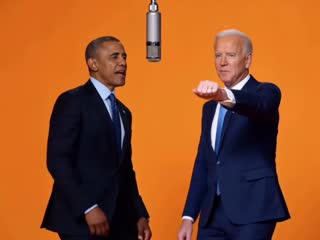
Here, “template” means the built-in visual direction inside the Hotel Lobby AI video generator, not a downloadable copy of the original music video. The recognizable ingredients are a saturated orange studio, two distinct performers, a microphone hanging between them, and a mostly fixed camera. The Hotel Lobby AI video generator should use these cues to make a new clip from your authorized photos. It should not place the original artists' footage or recording into your output.
A Stable Two-Person Frame
The Hotel Lobby AI video generator template works best when both performers stay readable in one shared shot. A steady view reduces the chance that rapid cuts or close zooms hide a face. This Hotel Lobby AI video generator framing also makes the handoff clear: one person takes a turn while the other reacts, then the energy shifts back.
One Microphone, Clear Center
The Hotel Lobby AI video generator uses the hanging microphone as the scene's central cue. Keep the performers on separate sides so the prop connects them without covering either face. Extra microphones, stage crowds, and busy scenery can weaken the Hotel Lobby AI video generator's simple orange-booth composition.
Your Pair Makes It Original
The Hotel Lobby AI video generator is most useful when the casting says something personal. Try two friends with different personalities, a couple sharing a joke, a parent and child, or a pet with its owner. The Hotel Lobby AI video generator scene stays familiar while the relationship changes. Review every result for consent and context before sharing it outside a private group.
Review a Hotel Lobby AI Video Generator Result
The Hotel Lobby AI video generator creates a new moving scene, so a good pair of uploads is a starting point, not a promise of a perfect export. Preview the full duration at normal speed before you download or post. Compare the first and final moments as well as the middle: a face may look correct at the start but drift after a gesture, and the microphone may move into an awkward position. A short review protects the joke and the people in it.
Identity and Placement
In a Hotel Lobby AI video generator preview, each performer should remain distinct and on the expected side. Watch for blended faces, sudden swaps, missing glasses or markings, and a person appearing twice. If Hotel Lobby AI video generator identity changes noticeably, replace the weaker source photo with a sharper, more direct portrait before making another attempt.
Motion and Framing
Check that the Hotel Lobby AI video generator keeps both subjects visible while they take turns. Hands, clothing edges, and a swinging microphone are common places to inspect in a Hotel Lobby AI video generator clip. One clear exchange often communicates the idea better than many overlapping gestures.
Sound and Sharing Rights
A Hotel Lobby AI video generator result should be reviewed with sound on and off. Do not assume it contains the original HOTEL LOBBY recording; song rights and platform music libraries are separate from the video scene. If you add music to a Hotel Lobby AI video generator clip, use audio you are allowed to post and label it as AI-made when viewers might otherwise mistake it for a real performance.
Costs and Limits for the Hotel Lobby AI Video Generator
Check the Hotel Lobby AI video generator controls for the available quality and credit charge before submitting a job. A 480p video costs 310 credits, 720p costs 664 credits, and 1080p costs 1,656 credits; new accounts do not automatically receive free credits. See the pricing page for monthly and yearly plans and one-time credit packs. A generation may take time, and the first output may need another attempt with better photos. The Hotel Lobby AI video generator is an independent tool inspired by the social format; it is not affiliated with COLORS, Quavo, Takeoff, or their labels.
Credits Are Shown Before Submission
Use the cost displayed by the Hotel Lobby AI video generator at the moment you submit. The 480p choice is 310 credits per video, 720p is 664 credits, and 1080p is 1,656 credits. The pricing page lists plan charges. Review the selected quality and your balance before generating.
Results Can Vary
The Hotel Lobby AI video generator cannot promise that every face, hand, outfit, or reaction stays identical to its reference image. Source photos with hidden features and crowded backgrounds raise that risk. Evaluate the Hotel Lobby AI video generator output as an interpretation and keep the original portraits available if you need to retry.
Inspired by a Performance
The orange-booth idea comes from Quavo and Takeoff's 2022 HOTEL LOBBY performance for A COLORS SHOW. The Hotel Lobby AI video generator is an independent recreation concept, not an official template or a source of the original audio. If you share a Hotel Lobby AI video generator result, credit the source performance accurately and choose music you can lawfully use.
Hotel Lobby AI Video Generator FAQ
Practical answers about the Hotel Lobby AI video generator workflow, the two-photo template, pricing, and responsible sharing.
Source inspiration: Quavo & Takeoff — HOTEL LOBBY | A COLORS SHOW. This site is independent of the artists and COLORS.
Prepare Your Hotel Lobby AI Video Generator Duo
Choose two clear, authorized photos, decide who belongs on each side, and review the available studio controls. The Hotel Lobby AI video generator is designed to turn that pair into a short orange-booth performance; inspect the finished clip, cost, and audio before sharing.