Hotel Lobby AI: Put Your Duo in the Orange Booth
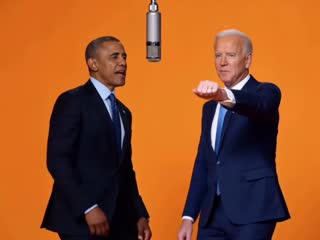
Use Hotel Lobby AI to turn two photos into a short AI video inspired by the orange-studio duet. Choose who stands on the left and right, then watch your pair trade the spotlight beside one hanging microphone.
Two photos · One duo · Made for sharing
Hotel Lobby AI Video Studio
0 credits available · 310 credits charged on generation
Hotel Lobby AI Video Ideas for Your First Duo
Hotel Lobby AI works because the scene stays simple while the cast changes. These are ideas for your own photos, not examples of videos generated by this site. Start with a pair whose reactions will be fun to watch, and make sure both people have agreed to appear.
Best Friends
With Hotel Lobby AI, put the friend who loves the camera on one side and the quieter friend on the other. The switch between lead performer and reaction is the joke, so choose photos where both faces are easy to recognize.
Family Duet
A Hotel Lobby AI family duet can pair relatives from different generations for a birthday or group chat. Use separate, well-lit portraits rather than cropping two small faces from a group photo.
Pet Partners
A Hotel Lobby AI pet duet can feature two pets or a pet alongside its owner. Visible eyes, clear fur markings, and an unobstructed body give the model more useful reference than a distant snapshot.
What Is Hotel Lobby AI?
Hotel Lobby AI is a way to make a short two-person performance video from your own photos. The name comes from Quavo and Takeoff's 2022 A COLORS SHOW performance of ‘HOTEL LOBBY,’ where they shared a hanging microphone against a saturated orange backdrop. In the Hotel Lobby AI trend, creators recast that recognizable setup with friends, relatives, pets, or original characters. It is an orange studio scene, not footage of a hotel reception. A Hotel Lobby AI video is recognizable through the simple set, the fixed two-person framing, and the handoff between one performer and the other. With Hotel Lobby AI, the photos identify your duo; video generation supplies movement and the performance setting. This site is an independent tool inspired by that social format. It is not affiliated with or endorsed by COLORS, Quavo, Takeoff, or their labels, and it does not claim to be the source of the original performance.
Two Distinct Performers
Hotel Lobby AI uses one photo to identify the left performer and a second photo identifies the right. Keeping those roles clear helps the pair read as a duet instead of a blended face or a single character duplicated on screen.
A Recognizable Stage
A Hotel Lobby AI video’s visual shorthand is a single-color orange studio, one microphone suspended in the center, soft frontal lighting, and a camera that lets viewers see both performers at once.
An Independent Remix
For Hotel Lobby AI, use photos and likenesses you have permission to animate. For public posts, choose audio you created or are allowed to use; the original recording is a separate copyrighted work.
What Makes a Hotel Lobby AI Video Recognizable?
A convincing Hotel Lobby AI duet depends on a few consistent choices, not a crowded set or a long prompt. The orange booth and shared microphone tell viewers which trend they are watching; the two distinct performers make each version personal.
Clear Left and Right Roles
In Hotel Lobby AI, each uploaded portrait has a defined place in the frame. Check the order before generation if the pairing or the first reaction matters to your story.
Alternating Energy
The appeal of Hotel Lobby AI is the handoff: one performer leans into the moment while the other reacts, then they exchange roles. Small, distinct gestures often read better than both characters moving in unison.
Simple, Stable Framing
In Hotel Lobby AI, a mostly fixed camera keeps both subjects visible and gives faces a better chance of staying recognizable. Fast cuts, zooms, and overlapping bodies can make AI motion harder to follow.
A Single Visual Cue
A Hotel Lobby AI scene uses one hanging microphone between two performers anchors the shot. Extra microphones, background crowds, and elaborate props weaken the familiar orange-booth composition.
Phone-Friendly Viewing
A short Hotel Lobby AI clip with large, readable faces is easier to understand in a scrolling feed. Review the crop before posting so neither performer disappears behind captions or platform controls.
Audio Added With Care
A Hotel Lobby AI performance and a licensed song are different things. If you want to use the original track, check the music options and posting rules on the platform where you will share the video.
How Hotel Lobby AI Turns Two Photos into a Video
The Hotel Lobby AI creation flow keeps the decisions small: provide one image for each performer, review the available output settings and displayed credit cost, then preview the result. You do not need to write a long video prompt to describe the booth yourself.
1. Choose Your Pair
For Hotel Lobby AI, upload one clear, authorized photo for the left performer and another for the right. A front-facing image with even light and one obvious subject is easier to use than a crowded or heavily filtered picture.
2. Review the Setup
In Hotel Lobby AI, check the two positions, the available quality option, and the cost shown before submitting. The built-in scene direction handles the orange background, centered microphone, and alternating performance.
3. Preview the Result
Watch the finished Hotel Lobby AI clip before sharing. Look at face consistency, left-right placement, hands, and audio. If something looks wrong, choose clearer photos and try a new generation.
Choose Photos That Help Hotel Lobby AI Keep Your Duo Clear
Your Hotel Lobby AI source photos do much of the work. AI video can distort small faces, hidden hands, and overlapping bodies, so start with simple images before thinking about outfits or a punchline. Separate portraits also make it easier to preserve who belongs on each side of the microphone.
Use One Subject Per Photo
Hotel Lobby AI works best when a direct portrait gives each performer a clear identity. Avoid a group selfie where several faces compete for attention, and upload the two people in the order you want them placed.
Show the Face Clearly
For Hotel Lobby AI, even front light and an unobstructed, sharp face are more useful than dramatic shadows. Remove sunglasses or heavy filters when they hide the eyes or change facial features.
Check Consent First
Use your own photos for Hotel Lobby AI or ask each person before uploading theirs. Permission matters especially when a clip could make someone appear to sing, speak, or endorse something they never did.
Ways to Use a Hotel Lobby AI Video
The best Hotel Lobby AI versions use a pair your audience already understands. You can keep the recognizable stage while changing the relationship, mood, or visual joke. Label the resulting clip as AI-made when a viewer might otherwise mistake it for a real performance.
Friends and Group Chats
A quick Hotel Lobby AI duet can turn a familiar friendship dynamic into a shareable joke. Pick the more expressive friend for one side and let the contrast in reactions carry the scene.
Couples and Anniversaries
Use Hotel Lobby AI with a pair of consenting partners for a playful greeting. The format is short enough for a message, while the shared microphone gives the video a clear beginning and handoff.
Parents and Grandparents
Hotel Lobby AI puts two generations in the same studio for a family surprise. Choose recent, recognizable portraits and check with the people involved before posting the result publicly.
Pets and Their People
In Hotel Lobby AI, a pet beside its owner changes the rhythm of the duet without changing the stage. Clear eyes and body markings help the animal remain identifiable between frames.
Original Characters
Place two characters you created into the Hotel Lobby AI booth and test how their personalities read in a shared shot. Avoid using a real person’s likeness or another creator’s character without permission.
Short Social Posts
Use the Hotel Lobby AI duet as a visual hook for a vertical feed. Check the final export and the music rights for the social platform you choose before you publish it.
The Performance Behind the Hotel Lobby AI Trend
Quavo and Takeoff released ‘HOTEL LOBBY’ as Unc & Phew in 2022 and performed it for A COLORS SHOW. The studio performance behind Hotel Lobby AI gave the later AI trend its visual language: two people, an orange backdrop, a shared hanging microphone, and a steady camera. AI remixes circulated widely in September 2026, including versions that replaced the performers with animals and fictional pairings. Hotel Lobby AI describes those remixes and the tools people use to make them; it is not the name of an official COLORS product. If you share a recreation, credit the source performance accurately and avoid suggesting that the original artists or show endorsed your version.
2022: The Source Performance
The original Quavo and Takeoff video establishes the orange set and the back-and-forth delivery. The title ‘Hotel Lobby’ refers to the song, not the location shown in the frame.
2026: AI Recasts Spread
Creators used image and motion tools to put different duos into the familiar scene. Reports documented cats, fictional characters, and celebrities among the circulating edits; the exact first creator is not established.
Your Version: Keep It Original
Make the pairing your own, use authorized photos, and choose audio with appropriate rights. An inspired new clip and a copy of the original recording or footage carry different permissions.
Hotel Lobby AI Frequently Asked Questions
Answers about the trend, photo choice, audio, and the two-photo creation flow.
Plan Your Hotel Lobby AI Duo
For Hotel Lobby AI, choose two clear photos, decide who stands on each side of the microphone, and see how the orange-booth performance comes together. Review photo rights and audio before sharing your finished clip.